AWS S3 Security Lab: Exploiting and Fixing Bucket Misconfigurations
These are my notes from an AWS S3 Security Lab that simulates a common cloud misconfiguration. The lab involves playing three roles: the developer who makes a mistake, the attacker who exploits it, and the security engineer who fixes it.
Core Concepts
S3 Global Namespace: Bucket names are globally unique, which is what allows attackers to "guess" them.
Block Public Access (BPA) vs. Bucket Policy: This is the key lesson.
- Block Public Access (BPA): This is the modern "safety latch" at the account or bucket level. It is ON by default and prevents public policies from being applied.
- Bucket Policy: This is a low-level JSON document that defines granular permissions. An
Allowrule forPrincipal: "*"(everyone) is extremely dangerous.
Regional Endpoints: S3 URLs are region-specific (e.g., s3.eu-north-1.amazonaws.com). An attacker must scan the correct regional endpoint.
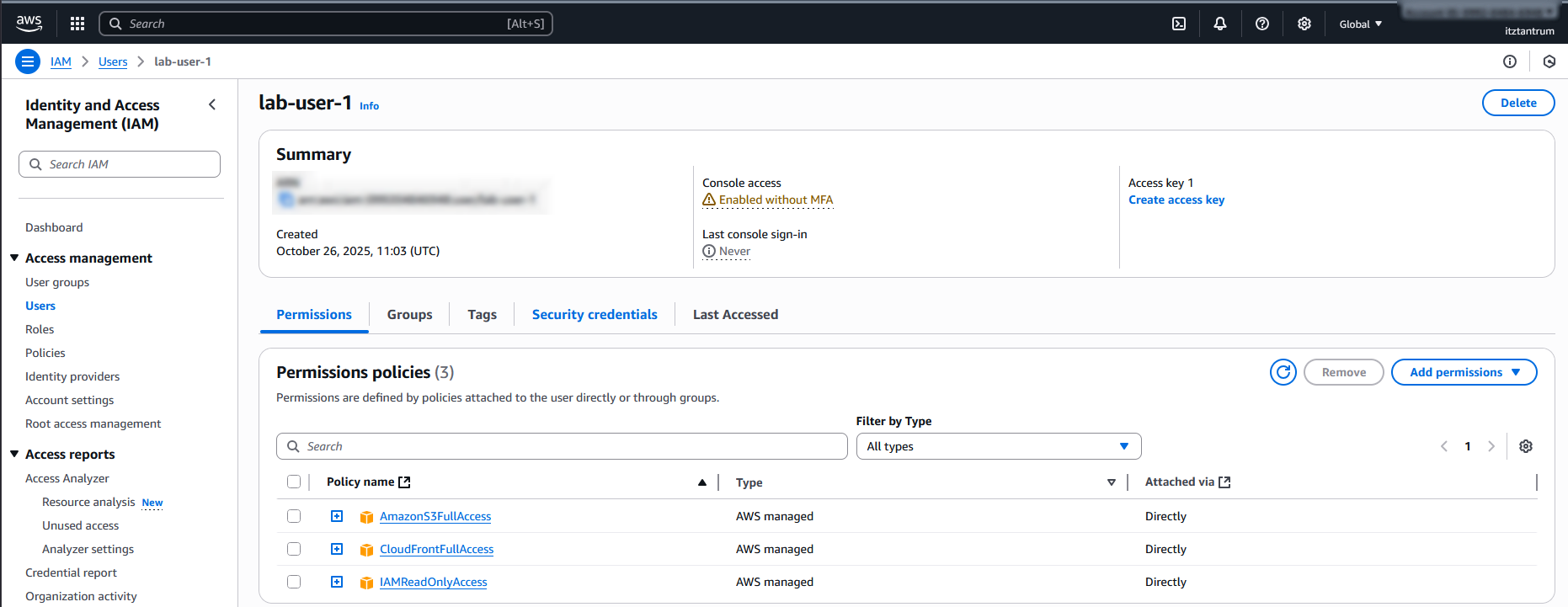
As a safety measure, I avoided using the root account and instead created a dedicated lab user with specific permissions:
Phase 1: Lab Preparation
- Created a directory for the screenshots
- Created a
secret.txtfile - Confirmed credentials using:
aws sts get-caller-identity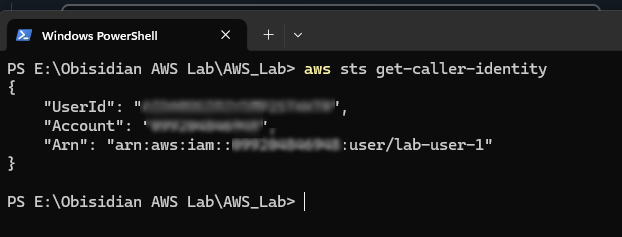
Phase 2: Creating Vulnerable Buckets
This lab was also valuable for learning general PowerShell commands, which can be useful in various scenarios beyond security.
Creating Globally Unique Bucket Names
This command generates a Unix timestamp to ensure bucket names are globally unique:
$TIMESTAMP = [int][double]::Parse((Get-Date -UFormat %s))Command breakdown:
Get-Date -UFormat %scallsGet-Datewith a Unix-stylestrftimeformat (%s= seconds since the epoch). This returns a string of seconds since 1970-01-01.[double]::Parse(...)parses that string into adoublenumeric value.[int]casts the double to an integer (drops any fractional part).- The final numeric value (an integer timestamp in seconds) is stored in the variable
$TIMESTAMP.
$BUCKET_A = "lab-project-alpha-$TIMESTAMP"
$BUCKET_B = "lab-project-beta-public-$TIMESTAMP" #
target
$BUCKET_C = "lab-project-gamma-$TIMESTAMP"
These three lines create string variables $BUCKET_A, $BUCKET_B, $BUCKET_C. The double-quoted strings allow variable interpolation, so $TIMESTAMP is expanded into the string.
$env:BUCKET_A = $BUCKET_A
$env:BUCKET_B = $BUCKET_B
$env:BUCKET_C = $BUCKET_C$env:NAMEsets an environment variable in the current PowerShell session.- These three assignments put the bucket-name strings into environment variables named
BUCKET_A,BUCKET_B, andBUCKET_C.
Set-Content -Path "buckets.txt" -Value "$BUCKET_A`n$BUCKET_B`n$BUCKET_C"Set-Contentwrites text to a file (overwriting if the file already exists).-Path "buckets.txt"sets the filename in the current working directory.-Value "$BUCKET_An$BUCKET_Bn$BUCKET_C"supplies the text to write. Because the string is double-quoted, the$BUCKET_*variables are expanded into their values.`nis PowerShell's escape for a newline character, so the file will contain three lines—one bucket name per line.
Creating the Buckets
aws s3 mb "s3://$env:BUCKET_A" --region eu-north-1
aws s3 mb "s3://$env:BUCKET_B" --region eu-north-1
aws s3 mb "s3://$env:BUCKET_C" --region eu-north-1
The buckets were created in the specified region, matching the AWS account region, using the environment variables stored within this session:
--region eu-north-1Uploading the Secret File
aws s3 cp secret.txt "s3://$BUCKET_B/secret.txt" --region eu-north-1Command breakdown:
| Component | Description |
|---|---|
aws s3 cp |
The AWS CLI's "copy" command for S3 |
secret.txt |
The source file |
"s3://$BUCKET_B/secret.txt" |
Destination path in S3. $BUCKET_B is a PowerShell variable that holds the S3 bucket name. The /secret.txt after the bucket name is the object's name in S3. |
Disabling Block Public Access
aws s3api put-public-access-block --bucket $env:BUCKET_B --public-access-block-configuration "BlockPublicAcls=false,IgnorePublicAcls=false,BlockPublicPolicy=false,RestrictPublicBuckets=false" --region eu-north-1
Command breakdown:
| Component | Description |
|---|---|
aws s3api |
Low-level S3 API interface. The s3api commands map directly to AWS S3 API operations requiring more explicit JSON-style parameters. |
put-public-access-block |
Sets the "Public Access Block" configuration on an S3 bucket |
--bucket $env:BUCKET_B |
Specifies which bucket to apply the configuration to |
--public-access-block-configuration |
Configuration string with four settings (all set to false) |
--region eu-north-1 |
Specifies the AWS region |
Public Access Block Settings:
| Setting | Default | Meaning |
|---|---|---|
| BlockPublicAcls | true | Prevents new public ACLs from being applied |
| IgnorePublicAcls | true | Ignores any existing public ACLs |
| BlockPublicPolicy | true | Blocks bucket policies that make the bucket public |
| RestrictPublicBuckets | true | Prevents cross-account public access |
Adding a Public Bucket Policy
Creating the policy file:
$POLICY = @"
{
    "Version": "2012-10-17",
    "Statement": [
        {
            "Sid": "PublicReadGetObject",
            "Effect": "Allow",
            "Principal": "*",
            "Action": "s3:GetObject",
            "Resource": "arn:aws:s3:::$env:BUCKET_B/*"
        },
        {
            "Sid": "PublicListBucket",
            "Effect": "Allow",
            "Principal": "*",
            "Action": "s3:ListBucket",
            "Resource": "arn:aws:s3:::$env:BUCKET_B"
        }
    ]
}
"@
Command breakdown:
@" ... "@is a PowerShell here-string. It allows you to define multi-line text (like JSON) without needing to escape quotes. Everything between@"and"@is stored as raw text in$POLICY.
JSON policy structure:
| Component | Description |
|---|---|
"Version": "2012-10-17" |
Standard AWS policy version |
"Statement" |
An array of one or more permission statements |
"Sid" |
Statement ID—just a label |
"Effect": "Allow" |
This grants permission (not deny) |
"Principal": "*" |
Means anyone, including anonymous users |
"Action": "s3:GetObject" |
Allows the action of downloading (GET) objects |
"Resource": "arn:aws:s3:::bucket/*" |
Targets all objects in that bucket |
"Action": "s3:ListBucket" |
Allows listing all objects (viewing bucket contents) |
"Resource" (without /*) |
The bucket itself |
Saving the policy to a file:
Set-Content -Path "policy.json" -Value $POLICYApplying the policy to the bucket via the CLI:
aws s3api put-bucket-policy --bucket $env:BUCKET_B --policy file://policy.json --region eu-north-1Command breakdown:
| Component | Description |
|---|---|
put-bucket-policy |
Attaches or replaces a bucket policy for a specific S3 bucket. Each bucket can have only one policy at a time; if one already exists, this overwrites it. |
--policy file://policy.json |
Tells AWS CLI to read the policy JSON from a local file |
Verifying the Vulnerability
Write-Host "https://$env:BUCKET_B.s3.eu-north-1.amazonaws.com/secret.txt"Write-Hostdisplays text directly to the PowerShell console (standard output).
With the full URL, I could access the file—the bucket's vulnerability is confirmed.

Phase 3: Exploiting the Vulnerability
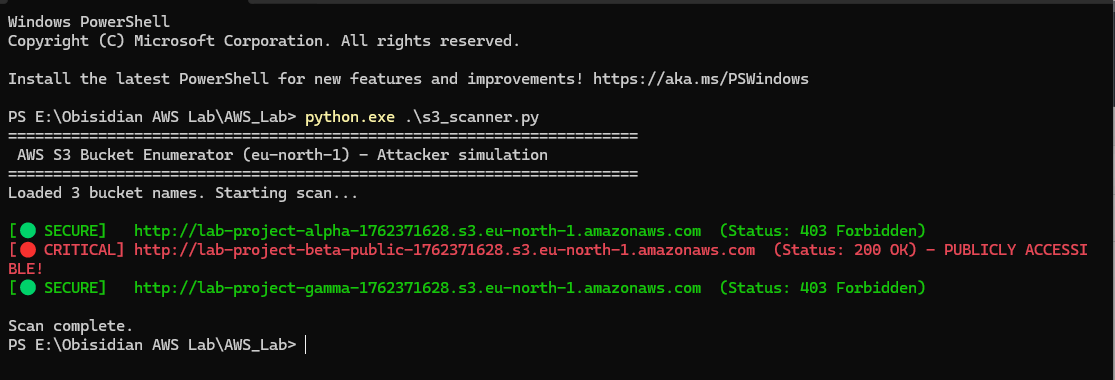
I created Python code to simulate an attacker scanning for accessible buckets. This demonstrates a realistic attack scenario that could occur if the bucket names list were leaked.
import requests
import sys
from requests.exceptions import RequestException

# ANSI color codes for terminal output
class bcolors:
    GREEN = '\033[92m'  # For 403 Forbidden (Secure)
    YELLOW = '\033[93m' # For 404 Not Found
    RED = '\033[91m'    # For 200 OK (PUBLIC!)
    ENDC = '\033[0m'    # Reset color

def check_bucket(bucket_name):
    """
    Checks a single S3 bucket for public accessibility in eu-north-1.
    """
    url = f"http://{bucket_name}.s3.eu-north-1.amazonaws.com"

    try:
        # We send a request with a short timeout.
        response = requests.head(url, timeout=3, allow_redirects=True)

        if response.status_code == 200:
            # 🔴 CRITICAL: 200 means the bucket is public and listable.
            print(f"{bcolors.RED}[🔴 CRITICAL] {url}  (Status: {response.status_code} OK) - PUBLICLY ACCESSIBLE!{bcolors.ENDC}")
        elif response.status_code == 403:
            # 🟢 GOOD: 403 means the bucket exists but is private.
            print(f"{bcolors.GREEN}[🟢 SECURE]   {url}  (Status: {response.status_code} Forbidden){bcolors.ENDC}")
        elif response.status_code == 404:
            # 🟡 INFO: 404 means the bucket does not exist.
            print(f"{bcolors.YELLOW}[🟡 INFO]     {url}  (Status: {response.status_code} Not Found){bcolors.ENDC}")
        else:
            # Any other code is unusual.
            print(f"[?] UNKNOWN:   {url}  (Status: {response.status_code})")

    except RequestException as e:
        # Handle network errors, timeouts, etc.
        print(f"[❌ ERROR]    Error checking {url}: {e}")

def main():
    """Main function to read the file and start the scan."""
    print("="*70)
    print(" AWS S3 Bucket Enumerator (eu-north-1) - Attacker simulation")
    print("="*70)

    try:
        with open('buckets.txt', 'r') as f:
            bucket_names = [line.strip() for line in f if line.strip()]

        if not bucket_names:
            print(f"{bcolors.RED}Error: 'buckets.txt' is empty.{bcolors.ENDC}")
            sys.exit(1)

        print(f"Loaded {len(bucket_names)} bucket names. Starting scan...\n")

        for name in bucket_names:
            check_bucket(name)

        print("\nScan complete.")

    except FileNotFoundError:
        print(f"{bcolors.RED}Error: 'buckets.txt' not found in this directory.{bcolors.ENDC}")
        print("Please create it with one bucket name per line.")
        sys.exit(1)

if __name__ == "__main__":
    main()
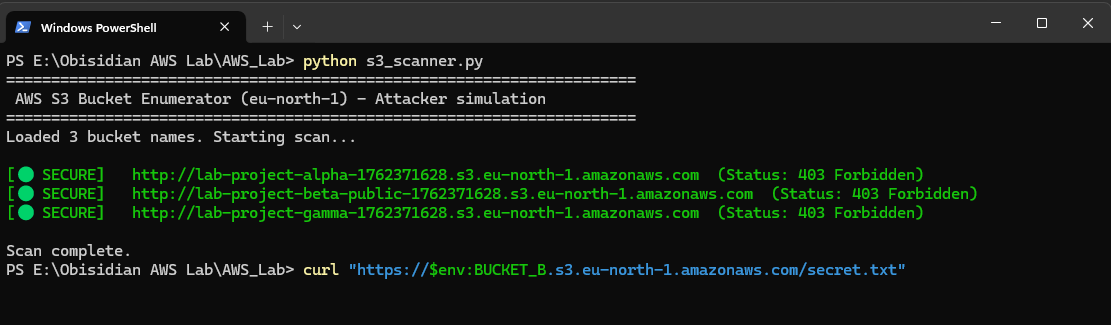
Running the scan:
Phase 4: Data Exfiltration
curl "https://$env:BUCKET_B.s3.eu-north-1.amazonaws.com/secret.txt"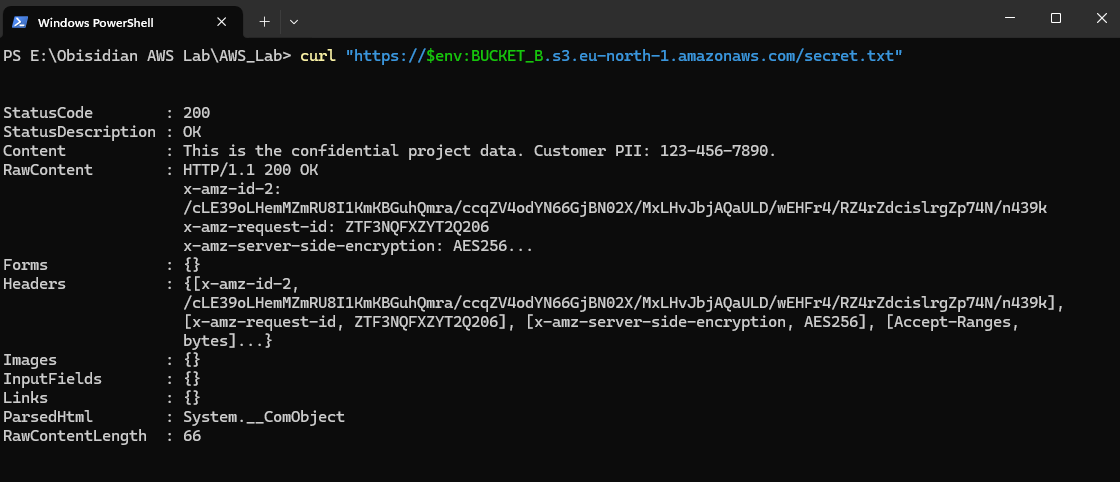
As an attacker without any credentials or permissions, I was able to access and download data from the bucket using CLI commands and scripts.
Phase 5: Remediation
Deleting the Bucket Policy
aws s3api delete-bucket-policy --bucket $env:BUCKET_B --region eu-north-1delete-bucket-policyremoves (deletes) any existing bucket policy attached to the specified bucket.
Enabling Block Public Access
aws s3api put-public-access-block --bucket $env:BUCKET_B --public-access-block-configuration "BlockPublicAcls=true,IgnorePublicAcls=true,BlockPublicPolicy=true,RestrictPublicBuckets=true" --region eu-north-1Verifying the Fix
The curl command now returns a 403 Forbidden error:
curl "https://$env:BUCKET_B.s3.eu-north-1.amazonaws.com/secret.txt"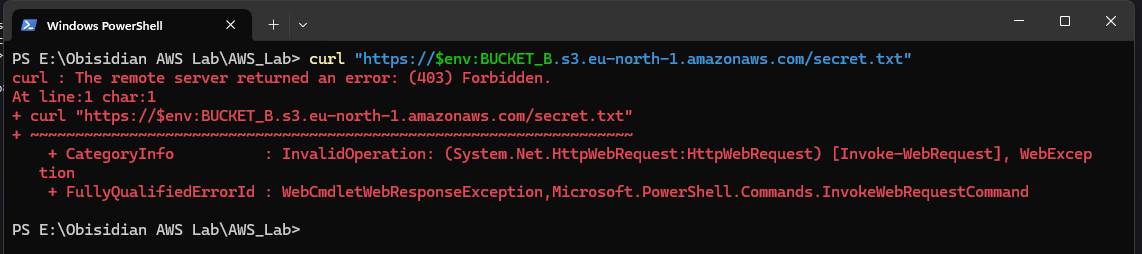
Access is also denied when opening the link directly in a browser:
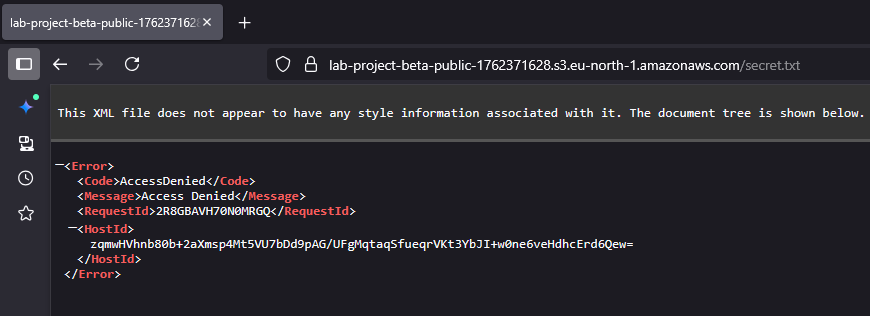
Using the scanner confirms that the secure settings have been restored:
Phase 6: Removing Unused Buckets
A key security measure is removing unused or empty buckets, as they pose an unnecessary security risk.
aws s3 rb "s3://$env:BUCKET_A" --region eu-north-1 --force
aws s3 rb "s3://$env:BUCKET_B" --region eu-north-1 --force
aws s3 rb "s3://$env:BUCKET_C" --region eu-north-1 --force
Lessons Learned
-
S3 Block Public Access (BPA) is your most important defense. It's a "safety latch" that blocks public policies and ACLs. It should remain enabled for nearly all use cases.
-
A Bucket Policy is a powerful, low-level permission. A policy with
Effect: "Allow"andPrincipal: "*"is extremely dangerous and should almost never be used. -
Attackers don't need credentials to find and steal from public buckets. They just need an internet connection and a list of names to guess for the correct region.