Python for AI - First Steps with Data
My notes from getting comfortable with the Python data stack. The goal wasn't to memorise the API surface of pandas or numpy - it was to reach the point where I could load a real dataset, understand its shape, clean it, and produce charts that say something meaningful. The lab uses the Titanic passenger dataset and builds two visualisations: a scatter plot and a correlation heatmap.
Why These Tools
When I started looking at the Python data ecosystem, the number of libraries was immediately overwhelming. The ones that kept appearing in everything AI-related were the same four: pandas, numpy, matplotlib, and seaborn. They're not interchangeable - each does a specific job.
numpy is the foundation. It provides an array type (ndarray) that's far more efficient than Python's built-in lists for numerical computation. Most data work in Python - whether you're doing statistics, machine learning, or image processing - eventually runs on numpy arrays under the hood, even when you're not touching numpy directly.
pandas sits on top of numpy and adds structure. Its core object is the DataFrame - a table with named columns and an index, like a spreadsheet that you can manipulate programmatically. It handles the messy parts of working with real data: loading files, dealing with missing values, filtering rows, aggregating groups.
matplotlib is the base plotting library. It gives you full control over every element of a figure. That control comes at the cost of verbosity - it can take a lot of code to produce a polished chart.
seaborn is built on top of matplotlib and provides higher-level chart types with sensible defaults. The correlation heatmap in this lab is much easier to produce in seaborn than in raw matplotlib, and it looks better out of the box.
I use all four in this lab, but the emphasis is on pandas for data handling and the two plotting libraries for visualisation. Numpy appears in the background and I'll point out where.
The Dataset - Titanic Passenger Data
The Titanic dataset is overused in data science tutorials, and I was initially reluctant to use it for that reason. I ended up using it anyway because it has properties that make it genuinely useful for a first exploration: it's small enough to inspect manually, it has a mix of numeric and categorical columns, it has missing values in predictable places, and the outcome variable (survived or not) is binary and easy to reason about.
The data covers 891 passengers and includes demographic information, ticket class, fare paid, and whether they survived. It does not tell the whole story - it covers passengers but not crew, and the data quality varies by class. Those limitations are worth knowing before drawing conclusions from it.
The CSV lives at a stable public URL on GitHub and loads directly with pandas.
The Security Angle - Data Before Analysis
Before touching any dataset, it's worth asking where it came from and whether it can be trusted.
This matters more than it sounds. In a research or production setting, the data feeding an analysis is the single largest source of potential distortion. Biased data produces biased models. Corrupted data produces models that fail in unpredictable ways. Data that's been manipulated by an adversary produces models that fail in predictable but hidden ways.
The Titanic dataset is well-studied and its provenance is documented - it originates from British Board of Trade inquiry records. That's a level of traceability most real-world datasets don't have.
The habit worth building: before running any analysis, document where the data came from, when it was collected, who collected it, and what selection or processing it went through. The exploratory steps in this lab - checking shape, types, null counts, value distributions - are not just housekeeping. They're the first pass at understanding whether the data is what it claims to be.
Lab: Exploring the Titanic Dataset
The lab has four stages: load and audit, clean, scatter plot, correlation heatmap. Each stage is its own script section - run them in order, or paste everything into one file.
Setup
pip3 install pandas numpy matplotlib seaborn --break-system-packages

touch titanic.py
nano titanic.py
Step 1 - Load and Audit the Data
import pandas as pd
import numpy as np
import matplotlib.pyplot as plt
import seaborn as sns

# The Titanic CSV from a well-known public repository.
# pandas reads directly from URLs  - no manual download needed.
URL = "https://raw.githubusercontent.com/datasciencedojo/datasets/master/titanic.csv"

df = pd.read_csv(URL)

# --- Initial audit ---
# Before doing anything else, understand what you have.

print("=== Shape ===")
print(f"  {df.shape[0]} rows, {df.shape[1]} columns\n")

print("=== Column types ===")
print(df.dtypes)
print()

print("=== Missing values ===")
print(df.isnull().sum())
print()

print("=== First five rows ===")
print(df.head())
print()

print("=== Numeric summary ===")
print(df.describe())
Run just this section first:
cd ~/ai-labs/post-03
python3 titanic.py
Terminal Output
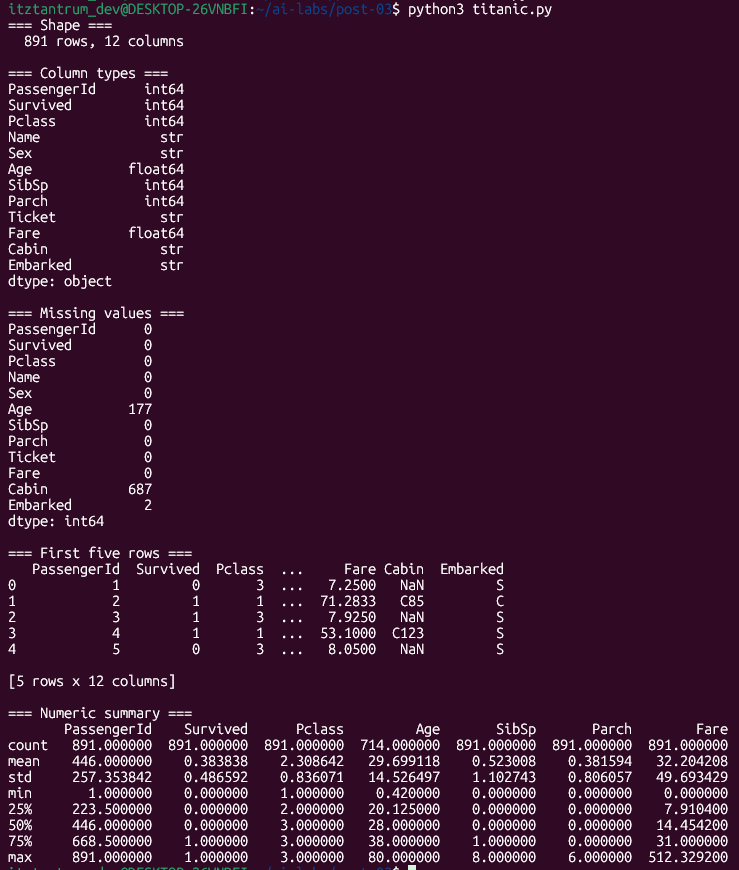
Three columns have missing values. Age is missing for 177 passengers (~20%). Cabin is missing for 687 (~77%) - effectively unusable. Embarked is missing for 2 rows, which is trivial.
The Age gap is the one that requires a decision. Either drop rows with missing age, or impute - fill in estimated values. For this lab, I'm dropping them. The reasoning: we're doing exploratory visualisation, not building a predictive model. Imputing age would introduce assumptions about how age is distributed, which would distort what the scatter plot shows. When the goal is to see the actual data, removing unknowns is cleaner than inventing values.
Step 2 - Clean
# Drop rows where Age is missing.
# We need Age for the scatter plot and don't want to impute it for EDA.
df_clean = df.dropna(subset=['Age']).copy()

# Verify the result
print(f"Rows remaining after dropping missing Age: {len(df_clean)}")
print(f"Null counts in Age column: {df_clean['Age'].isnull().sum()}")

# Encode Sex as a number for correlation analysis later.
# pandas' map() applies a dictionary lookup to every value in the column.
# male -> 0, female -> 1
df_clean['Sex_encoded'] = df_clean['Sex'].map({'male': 0, 'female': 1})
Step 3 - Scatter Plot: Age vs Fare, Coloured by Survival
A scatter plot with a colour dimension is one of the most informative single charts you can make on tabular data. It shows the relationship between two continuous variables and simultaneously encodes a third variable through colour - here, whether the passenger survived.
fig, ax = plt.subplots(figsize=(9, 6))

# Plot each survival outcome as a separate series so they appear in the legend.
colours = {0: 'tomato', 1: 'steelblue'}
labels  = {0: 'Did not survive', 1: 'Survived'}

for outcome in [0, 1]:
    subset = df_clean[df_clean['Survived'] == outcome]
    ax.scatter(
        subset['Age'],
        subset['Fare'],
        c=colours[outcome],
        alpha=0.45,      # partial transparency so overlapping points are visible
        s=22,            # point size
        label=labels[outcome]
    )

ax.set_xlabel('Age')
ax.set_ylabel('Fare (£)')
ax.set_title('Age vs Fare  - coloured by survival outcome')
ax.legend()

plt.tight_layout()
plt.savefig('scatter_age_fare.png', dpi=150)
plt.close()
print("Saved: scatter_age_fare.png")
python3 titanic.py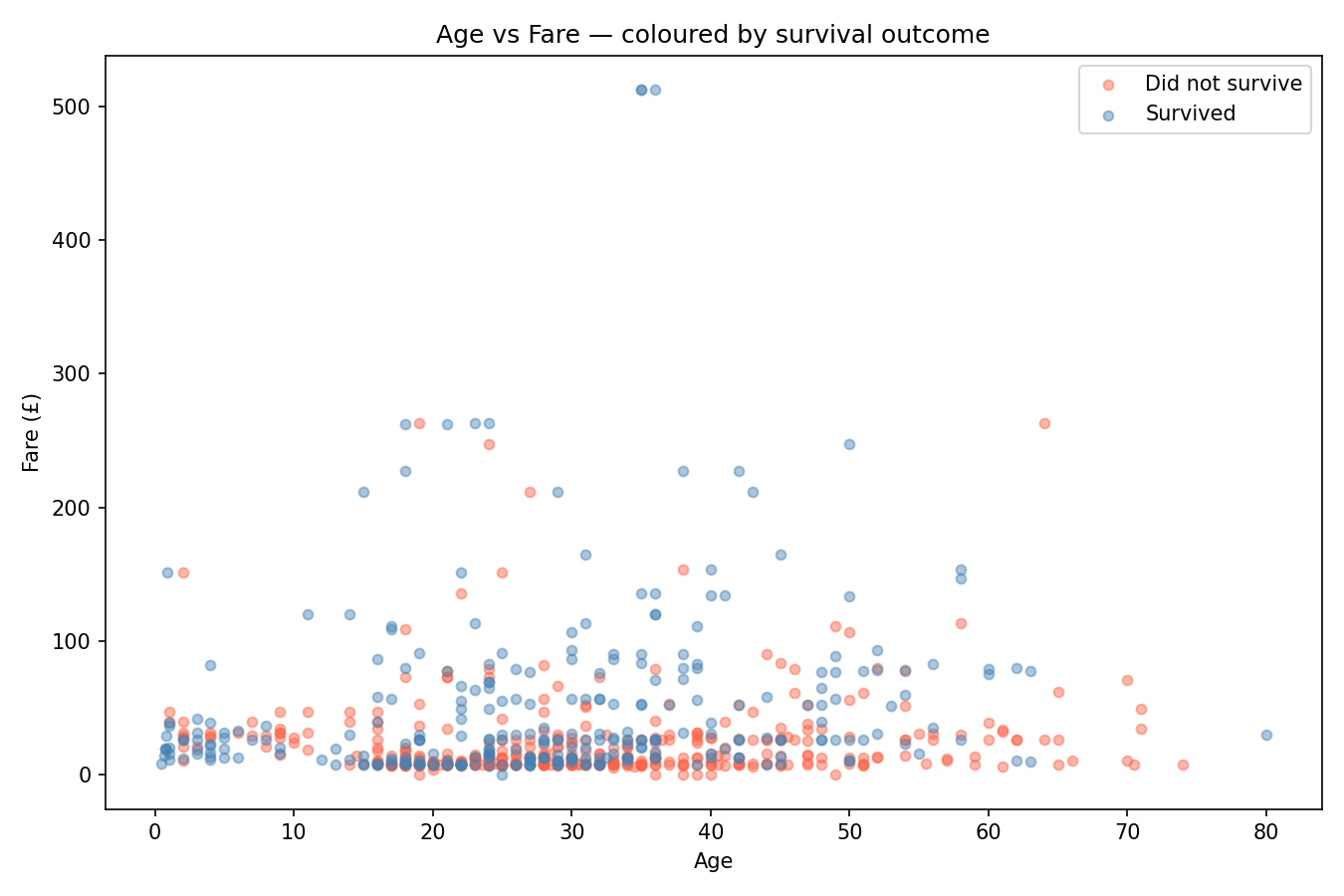
What to look for: High-fare passengers cluster in the upper portion of the chart. The survival rate among that cluster is visibly higher - more blue than red. Low-fare passengers are densely packed at the bottom, and the survival rate there is lower. Age alone shows no obvious pattern - survivors and non-survivors are spread across all ages at similar fare levels. The fare variable is doing most of the visible work here.
Step 4 - Correlation Heatmap
A scatter plot shows one pair of variables. A correlation heatmap shows all pairs at once - it computes the correlation between every combination of numeric columns and displays the matrix as a colour-coded grid.
Correlation here means Pearson correlation: a value between -1 and 1.
1.0- the two columns move together perfectly (as one goes up, the other does too)-1.0- they move in opposite directions perfectly0.0- no linear relationship
# Select the numeric columns that are meaningful for correlation analysis.
# Dropping PassengerId (arbitrary identifier) and Sex_encoded separately below.
numeric_cols = ['Survived', 'Pclass', 'Age', 'SibSp', 'Parch', 'Fare', 'Sex_encoded']

corr = df_clean[numeric_cols].corr()

print("=== Correlation matrix ===")
print(corr.round(2))

fig, ax = plt.subplots(figsize=(8, 6))

sns.heatmap(
    corr,
    annot=True,       # print the correlation value inside each cell
    fmt='.2f',        # two decimal places
    cmap='coolwarm',  # blue = positive, red = negative, white = near zero
    center=0,         # anchor the colour scale at zero
    linewidths=0.5,   # thin lines between cells for readability
    ax=ax
)

ax.set_title('Correlation matrix  - Titanic numeric features')
plt.tight_layout()
plt.savefig('heatmap_correlation.png', dpi=150)
plt.close()
print("Saved: heatmap_correlation.png")
Output
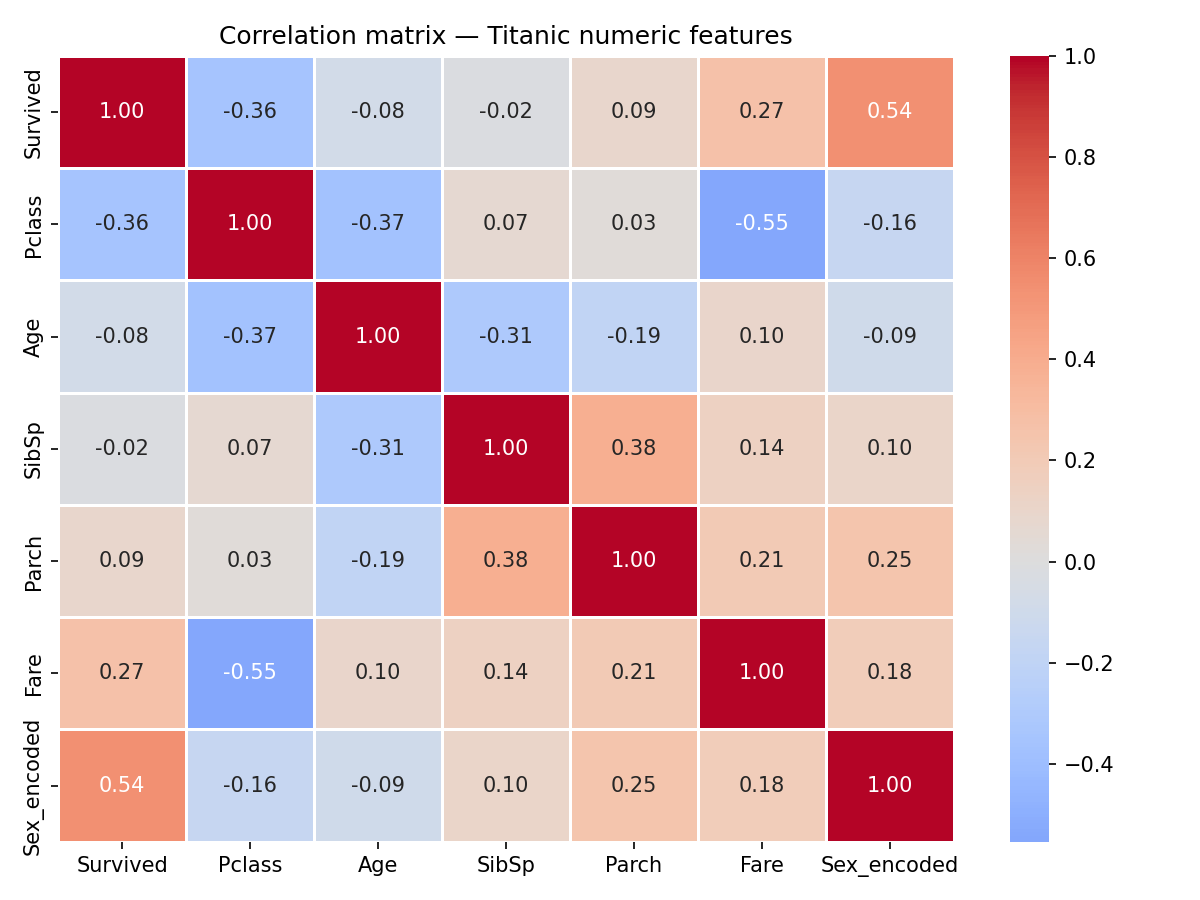
Reading the heatmap: Each cell shows the correlation between the row variable and the column variable. The diagonal is always 1.0 - every variable correlates perfectly with itself. The matrix is symmetric - the upper-right triangle mirrors the lower-left.
Things worth noting in this data:
Sex_encoded has the strongest correlation with Survived at 0.54. Women (encoded as 1) survived at a much higher rate. This is the most significant single predictor in the dataset.
Pclass and Fare have a strong negative correlation of -0.55. Higher class (lower number) means higher fare - these two variables are largely measuring the same underlying thing from different angles. Including both in a predictive model would introduce redundancy.
Pclass and Survived correlate at -0.36. Lower class (higher number) meant lower survival probability. Combined with the fare finding, the pattern is consistent: economic status was a strong factor in survival outcomes.
SibSp and Parch correlate at 0.38 with each other - both are family size measures (siblings/spouses and parents/children respectively), so that's expected. Neither correlates strongly with survival.
Age shows weak correlations with most variables. The scatter plot suggested this - age alone doesn't predict much here.
What the Analysis Showed
The scatter plot made one thing immediately visible: fare paid is a strong visual separator between survivors and non-survivors. Age is not - survivors and non-survivors are spread across the full age range at every fare level.
The heatmap made the structure clearer. Sex_encoded is the single strongest numeric predictor of survival (0.54). Pclass and Fare are highly correlated with each other (-0.55) and both correlate with survival - Pclass at -0.36, Fare at 0.27. Age correlates weakly with almost everything.
These findings align with the historical record - women and first-class passengers had priority access to lifeboats. The data reflects that. What's useful about the visualisation step is that it surfaces these patterns before any modelling - the charts carry the finding without needing a classifier.
One thing I find worth noting: the analysis above is descriptive, not causal. The correlations say which variables move together, not why. Pclass correlating with Survived doesn't prove that passenger class caused differential survival rates - it's consistent with that explanation, but other variables (location of cabin relative to lifeboats, boarding port, social connections to crew) aren't in this dataset and could be confounding.
That distinction - correlation versus causation - is easy to state but genuinely easy to forget in practice when the numbers look clean and the story is compelling.
What I Took from This
- pandas'
DataFrameis the standard container for tabular data in Python. The audit steps - shape, dtypes, null counts, describe - are the same every time, regardless of the dataset. - Missing values require a decision, not just a default. The right choice depends on what you're doing with the data. Dropping versus imputing have different implications and shouldn't be made automatically.
- A scatter plot with colour encoding is one of the most information-dense single charts available. It shows two continuous relationships and a categorical distinction simultaneously.
- A correlation heatmap gives a fast structural overview of a dataset. It surfaces redundant variables (high mutual correlation) and strong predictors (high correlation with the outcome variable) before any modelling work begins.
- Correlation is not causation. The pattern in this data is real and interpretable, but the data doesn't contain everything that influenced survival. Clean correlations in a small dataset are not the same as established causal relationships.
- Data provenance matters. The questions to ask before analysing any dataset: where did it come from, who collected it, what's missing, and what might have been excluded.