AWS S3 Security Lab 3: The Credentialed User
archivedKept for reference and no longer updated. Parts of it may be out of date or wrong.
This is the third lab in the AWS S3 Security series. It focuses on the most secure pattern: granting access only to specific authenticated users. The goal is to demonstrate that who you are (credentials) matters more than where you are.
Phase 1: Setup
As usual, I've created a bucket using a unique identifier generated via timestamp.

$TIMESTAMP = [int](Get-Date -UFormat %s)
$BUCKET_NAME = "lab-3-iam-lock-$TIMESTAMP"
aws s3 mb "s3://$BUCKET_NAME" --region eu-north-1
In the next step, I generated a test file to upload to the bucket.

aws s3 cp user-profile.txt "s3://$BUCKET_NAME/user-profile.txt" --region eu-north-1Verifying Access
First, I verified if the file is readable through the curl command:

curl "https://$BUCKET_NAME.s3.eu-north-1.amazonaws.com/user-profile.txt"The request failed. The curl command sends an unauthenticated HTTPS GET request directly to the S3 bucket's public endpoint, proving the bucket is not publicly accessible.
Next, I used the AWS CLI, which authenticates with configured AWS credentials.

aws s3 cp "s3://$BUCKET_NAME/user-profile.txt" ".\admin-download.txt" --region eu-north-1
Get-Content ".\admin-download.txt"
The AWS CLI sends a signed API request to S3 using configured credentials. S3 verifies the identity, confirms the IAM user has permission to read the object, and allows the download.
Phase 2: Creating a Restricted User
After logging into the Console, I navigated to the IAM Panel and created a user named lab-3-restricted-user.
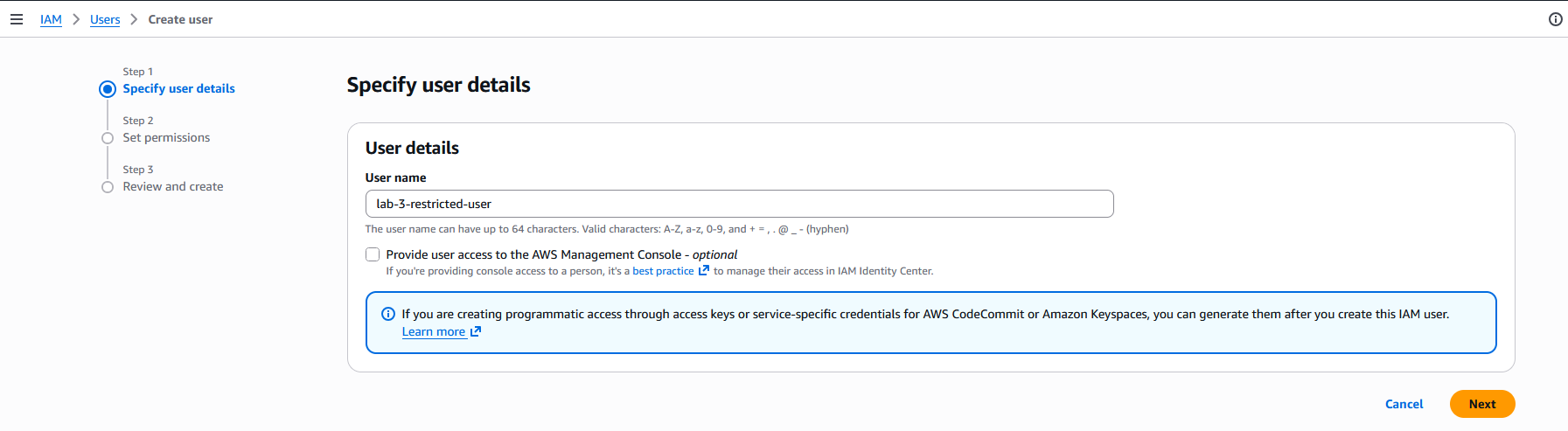
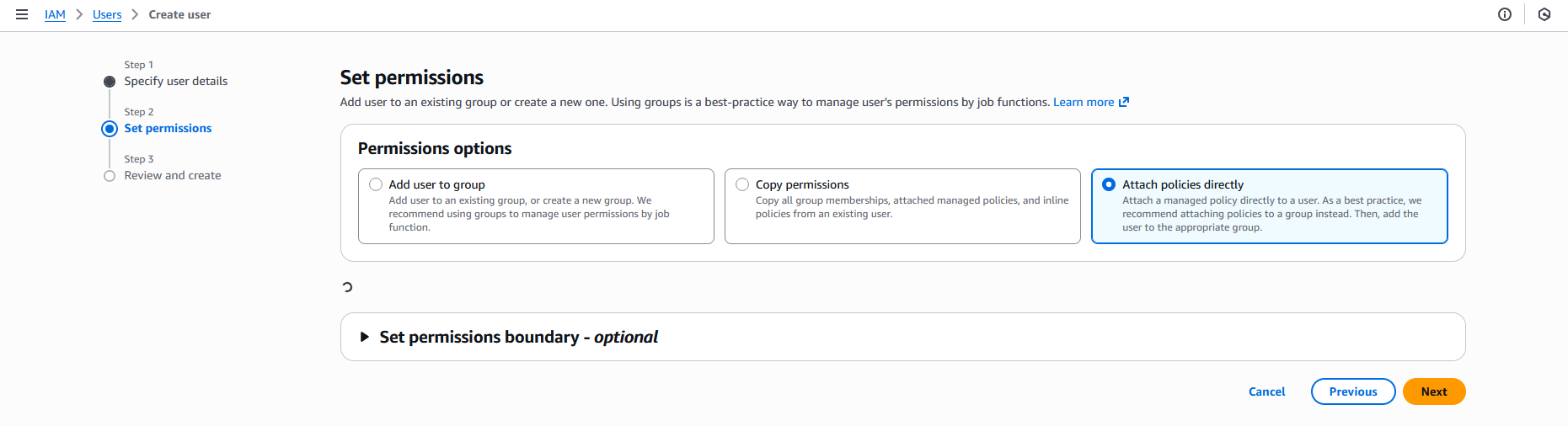
I left the permissions field blank:
The user was successfully created:

Note: I had to log into the root account to add IAMFullAccess permissions to my lab account before I could create new IAM users.
As the final step, I created access keys for this user:

Phase 3: Acting as a Restricted User
First, I configured a new CLI profile:
aws configure set aws_access_key_id $ACCESS_KEY_ID --profile restricted-user
aws configure set aws_secret_access_key $SECRET_ACCESS_KEY --profile restricted-user
aws configure set region eu-north-1 --profile restricted-user
aws configure set output json --profile restricted-user
After configuring the profile, I verified the new identity:
$IDENTITY = aws sts get-caller-identity --profile restricted-user | ConvertFrom-Json
$USER_ARN = $IDENTITY.Arn
$USER_ARN
Understanding the Commands
aws sts get-caller-identity calls the AWS STS (Security Token Service) API to return information about the IAM user or role whose credentials are being used.
--profile restricted-user tells AWS CLI to use credentials from the restricted-user profile in your local AWS config.
| ConvertFrom-Json converts the JSON output into a PowerShell object with properties:
$IDENTITY.UserId$IDENTITY.Account$IDENTITY.Arn
$USER_ARN = $IDENTITY.Arn extracts only the ARN (Amazon Resource Name) for later use.
| Line | Purpose | Result |
|---|---|---|
aws sts get-caller-identity |
Ask AWS "who am I?" under this profile | Returns account, user ID, and ARN |
ConvertFrom-Json |
Convert JSON to PowerShell object | Easier to access properties |
$IDENTITY.Arn |
Extract just the ARN | e.g., arn:aws:iam::... |
Add-Content ... lab-env.ps1 |
Save it in a reusable script | Lets you reimport later |
$USER_ARN |
Display ARN | Confirms your identity |
Testing Access
Now I'll check if the uploaded file is accessible using the aws s3 cp command:
aws s3 cp "s3://$BUCKET_NAME/user-profile.txt" ".\restricted-download.txt" --region eu-north-1 --profile restricted-user
Security is working as intended. The user has no permissions.
Phase 4: Fixing the Permissions
Creating a bucket policy:
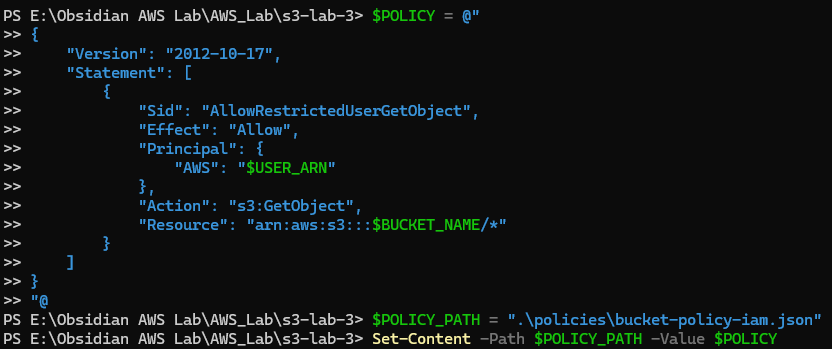
$POLICY = @"
{
    "Version": "2012-10-17",
    "Statement": [
        {
            "Sid": "AllowRestrictedUserGetObject",
            "Effect": "Allow",
            "Principal": {
                "AWS": "$USER_ARN"
            },
            "Action": "s3:GetObject",
            "Resource": "arn:aws:s3:::$BUCKET_NAME/*"
        }
    ]
}
"@

$POLICY_PATH = ".\policies\bucket-policy-iam.json"
Set-Content -Path $POLICY_PATH -Value $POLICY
Understanding the Policy
| Field | Meaning |
|---|---|
"Version": "2012-10-17" |
Standard policy version; always this value for AWS JSON policies |
"Statement" |
Main block that lists one or more permission rules |
"Sid" |
Statement ID (optional name for this rule) |
"Effect": "Allow" |
Grants permission rather than denying it |
"Principal": { "AWS": "$USER_ARN" } |
Identifies who gets the permission - here, the IAM user stored in $USER_ARN |
"Action": "s3:GetObject" |
Grants permission to download objects from the bucket |
"Resource": "arn:aws:s3:::$BUCKET_NAME/*" |
Applies this rule to all objects inside the specified bucket |
Applying the bucket policy:

Phase 5: Verification
Re-running the previously failed command:
aws s3 cp "s3://$BUCKET_NAME/user-profile.txt" ".\restricted-download.txt" --region eu-north-1 --profile restricted-user
Download succeeded!
Testing Permission Boundaries
List bucket:
aws s3 ls "s3://$BUCKET_NAME/" --profile restricted-user Result: Failed
Upload to bucket:
"Test" | Out-File "test-upload.txt"
aws s3 cp "test-upload.txt" "s3://$BUCKET_NAME/test-upload.txt" --profile restricted-user
Result: Failed
Delete object:
aws s3 rm "s3://$BUCKET_NAME/user-profile.txt" --profile restricted-user
Result: Failed
Phase 6: IAM Policy
This phase demonstrates the difference between a Bucket Policy (resource-based) and an IAM Policy (identity-based).
Key Differences
Bucket Policy:
- Attached to: The S3 bucket
- Has
Principalfield: Specifies who gets access - Use case: Granting cross-account access or centralizing permissions on the resource
IAM Policy:
- Attached to: The IAM user, role, or group
- No
Principalfield: Implicitly applies to the attached identity - Use case: Managing what a user can do
Remove the Bucket Policy
aws s3api delete-bucket-policy --bucket $BUCKET_NAME --region eu-north-1Verify access is denied again:
aws s3 cp "s3://$BUCKET_NAME/user-profile.txt" ".\test.txt" --profile restricted-userCreate an IAM Policy
$IAM_POLICY = @"
{
    "Version": "2012-10-17",
    "Statement": [
        {
            "Sid": "AllowGetObjectOnSpecificBucket",
            "Effect": "Allow",
            "Action": "s3:GetObject",
            "Resource": "arn:aws:s3:::$BUCKET_NAME/*"
        }
    ]
}
"@

$IAM_POLICY_PATH = ".\policies\user-iam-policy.json"
Set-Content -Path $IAM_POLICY_PATH -Value $IAM_POLICY
Note: No Principal field! This policy applies to whoever it's attached to.
Attach the IAM Policy to the User
aws iam put-user-policy --user-name lab-3-restricted-user --policy-name S3GetObjectPolicy --policy-document file://$IAM_POLICY_PATHTesting the Result
aws s3 cp "s3://$BUCKET_NAME/user-profile.txt" ".\iam-policy-download.txt" --region eu-north-1 --profile restricted-user
File was downloaded successfully!
Phase 7: Condition Blocks
This phase demonstrates adding conditional restrictions to policies by combining IAM authentication with IP-based access controls.
Remove the Old Policy
aws iam delete-user-policy --user-name lab-3-restricted-user --policy-name S3GetObjectPolicyCreate a Policy with IP Restrictions
$MULTI_FACTOR_POLICY = @"
{
    "Version": "2012-10-17",
    "Statement": [
        {
            "Sid": "AllowRestrictedUserFromSpecificIP",
            "Effect": "Allow",
            "Principal": {
                "AWS": "$USER_ARN"
            },
            "Action": "s3:GetObject",
            "Resource": "arn:aws:s3:::$BUCKET_NAME/*",
            "Condition": {
                "IpAddress": {
                    "aws:SourceIp": "$MY_IP/32"
                }
            }
        }
    ]
}
"@

$MULTI_POLICY_PATH = ".\policies\bucket-policy-multi-factor.json"
Set-Content -Path $MULTI_POLICY_PATH -Value $MULTI_FACTOR_POLICY
Apply the New Policy
aws s3api put-bucket-policy --bucket $BUCKET_NAME --policy file://$MULTI_POLICY_PATH --region eu-north-1Testing the Results
aws s3 cp "s3://$BUCKET_NAME/user-profile.txt" ".\multi-factor-test.txt" --region eu-north-1 --profile restricted-user
Access granted! The policy now requires both valid credentials and the correct source IP address.