AWS S3 Security Lab: Exploiting and Fixing Bucket Misconfigurations
archivedKept for reference and no longer updated. Parts of it may be out of date or wrong.
These are my notes from an AWS S3 Security Lab that simulates a common cloud misconfiguration. The lab involves playing three roles: the developer who makes a mistake, the attacker who exploits it, and the security engineer who fixes it.
Core Concepts
S3 Global Namespace: Bucket names are globally unique, which is what allows attackers to "guess" them.
Block Public Access (BPA) vs. Bucket Policy: This is the key lesson.
- Block Public Access (BPA): This is the modern "safety latch" at the account or bucket level. It is ON by default and prevents public policies from being applied.
- Bucket Policy: This is a low-level JSON document that defines granular permissions. An
Allowrule forPrincipal: "*"(everyone) is extremely dangerous.
Regional Endpoints: S3 URLs are region-specific (e.g., s3.eu-north-1.amazonaws.com). An attacker must scan the correct regional endpoint.
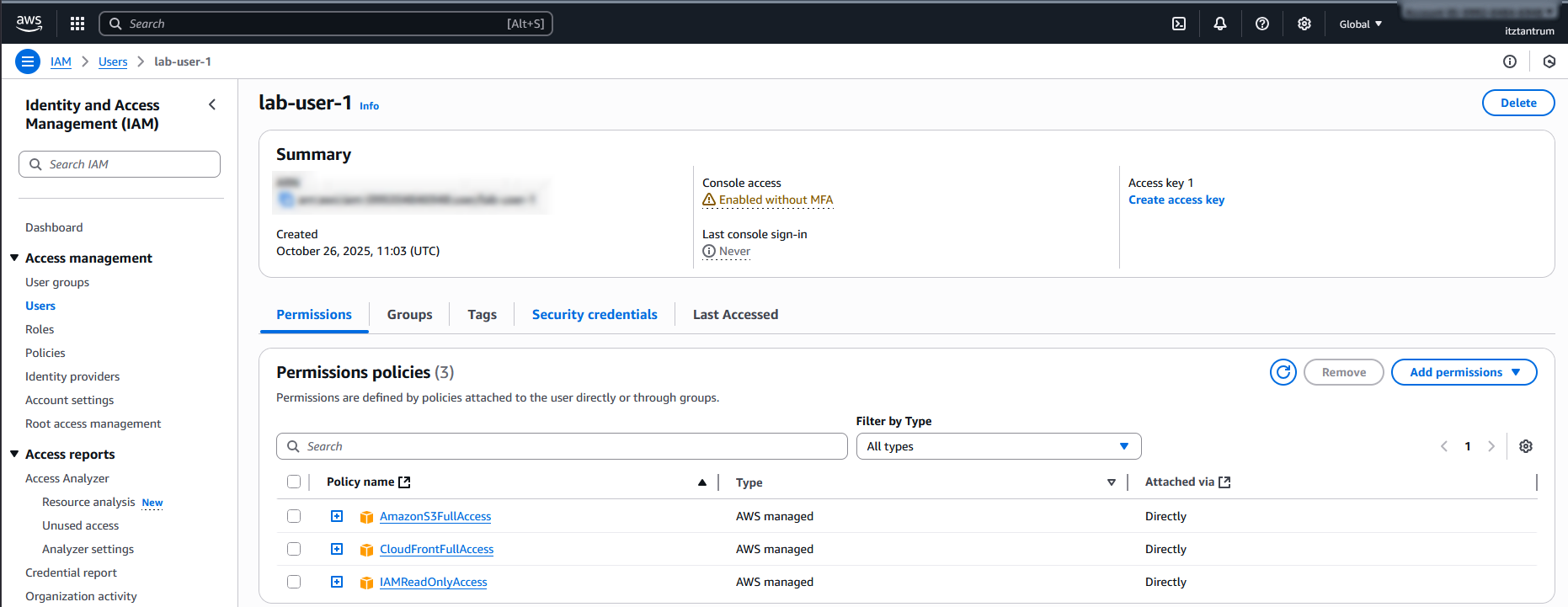
As a safety measure, I avoided using the root account and instead created a dedicated lab user with specific permissions:
Phase 1: Lab Preparation
- Created a directory for the screenshots
- Created a
secret.txtfile - Confirmed credentials using:
aws sts get-caller-identity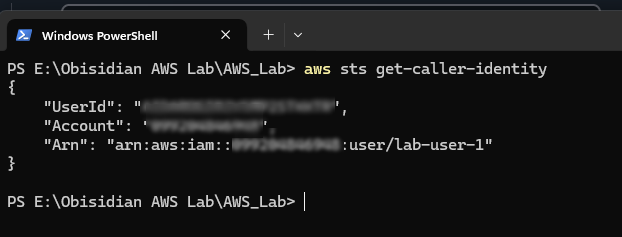
Phase 2: Creating Vulnerable Buckets
This lab was also valuable for learning general PowerShell commands, which can be useful in various scenarios beyond security.
Creating Globally Unique Bucket Names
This command generates a Unix timestamp to ensure bucket names are globally unique:
$TIMESTAMP = [int][double]::Parse((Get-Date -UFormat %s))Command breakdown:
Get-Date -UFormat %scallsGet-Datewith a Unix-stylestrftimeformat (%s= seconds since the epoch). This returns a string of seconds since 1970-01-01.[double]::Parse(...)parses that string into adoublenumeric value.[int]casts the double to an integer (drops any fractional part).- The final numeric value (an integer timestamp in seconds) is stored in the variable
$TIMESTAMP.
$BUCKET_A = "lab-project-alpha-$TIMESTAMP"
$BUCKET_B = "lab-project-beta-public-$TIMESTAMP" #
target
$BUCKET_C = "lab-project-gamma-$TIMESTAMP"
These three lines create string variables $BUCKET_A, $BUCKET_B, $BUCKET_C. The double-quoted strings allow variable interpolation, so $TIMESTAMP is expanded into the string.
$env:BUCKET_A = $BUCKET_A
$env:BUCKET_B = $BUCKET_B
$env:BUCKET_C = $BUCKET_C$env:NAMEsets an environment variable in the current PowerShell session.- These three assignments put the bucket-name strings into environment variables named
BUCKET_A,BUCKET_B, andBUCKET_C.
Set-Content -Path "buckets.txt" -Value "$BUCKET_A`n$BUCKET_B`n$BUCKET_C"Set-Contentwrites text to a file (overwriting if the file already exists).-Path "buckets.txt"sets the filename in the current working directory.-Value "$BUCKET_An$BUCKET_Bn$BUCKET_C"supplies the text to write. Because the string is double-quoted, the$BUCKET_*variables are expanded into their values.`nis PowerShell's escape for a newline character, so the file will contain three lines—one bucket name per line.
Creating the Buckets
aws s3 mb "s3://$env:BUCKET_A" --region eu-north-1
aws s3 mb "s3://$env:BUCKET_B" --region eu-north-1
aws s3 mb "s3://$env:BUCKET_C" --region eu-north-1
The buckets were created in the specified region, matching the AWS account region, using the environment variables stored within this session:
--region eu-north-1Uploading the Secret File
aws s3 cp secret.txt "s3://$BUCKET_B/secret.txt" --region eu-north-1Command breakdown:
| Component | Description |
|---|---|
aws s3 cp |
The AWS CLI's "copy" command for S3 |
secret.txt |
The source file |
"s3://$BUCKET_B/secret.txt" |
Destination path in S3. $BUCKET_B is a PowerShell variable that holds the S3 bucket name. The /secret.txt after the bucket name is the object's name in S3. |
Disabling Block Public Access
aws s3api put-public-access-block --bucket $env:BUCKET_B --public-access-block-configuration "BlockPublicAcls=false,IgnorePublicAcls=false,BlockPublicPolicy=false,RestrictPublicBuckets=false" --region eu-north-1
Command breakdown:
| Component | Description |
|---|---|
aws s3api |
Low-level S3 API interface. The s3api commands map directly to AWS S3 API operations requiring more explicit JSON-style parameters. |
put-public-access-block |
Sets the "Public Access Block" configuration on an S3 bucket |
--bucket $env:BUCKET_B |
Specifies which bucket to apply the configuration to |
--public-access-block-configuration |
Configuration string with four settings (all set to false) |
--region eu-north-1 |
Specifies the AWS region |
Public Access Block Settings:
| Setting | Default | Meaning |
|---|---|---|
| BlockPublicAcls | true | Prevents new public ACLs from being applied |
| IgnorePublicAcls | true | Ignores any existing public ACLs |
| BlockPublicPolicy | true | Blocks bucket policies that make the bucket public |
| RestrictPublicBuckets | true | Prevents cross-account public access |
Adding a Public Bucket Policy
Creating the policy file:
$POLICY = @"
{
    "Version": "2012-10-17",
    "Statement": [
        {
            "Sid": "PublicReadGetObject",
            "Effect": "Allow",
            "Principal": "*",
            "Action": "s3:GetObject",
            "Resource": "arn:aws:s3:::$env:BUCKET_B/*"
        },
        {
            "Sid": "PublicListBucket",
            "Effect": "Allow",
            "Principal": "*",
            "Action": "s3:ListBucket",
            "Resource": "arn:aws:s3:::$env:BUCKET_B"
        }
    ]
}
"@
Command breakdown:
@" ... "@is a PowerShell here-string. It allows you to define multi-line text (like JSON) without needing to escape quotes. Everything between@"and"@is stored as raw text in$POLICY.
JSON policy structure:
| Component | Description |
|---|---|
"Version": "2012-10-17" |
Standard AWS policy version |
"Statement" |
An array of one or more permission statements |
"Sid" |
Statement ID—just a label |
"Effect": "Allow" |
This grants permission (not deny) |
"Principal": "*" |
Means anyone, including anonymous users |
"Action": "s3:GetObject" |
Allows the action of downloading (GET) objects |
"Resource": "arn:aws:s3:::bucket/*" |
Targets all objects in that bucket |
"Action": "s3:ListBucket" |
Allows listing all objects (viewing bucket contents) |
"Resource" (without /*) |
The bucket itself |
Saving the policy to a file:
Set-Content -Path "policy.json" -Value $POLICYApplying the policy to the bucket via the CLI:
aws s3api put-bucket-policy --bucket $env:BUCKET_B --policy file://policy.json --region eu-north-1Command breakdown:
| Component | Description |
|---|---|
put-bucket-policy |
Attaches or replaces a bucket policy for a specific S3 bucket. Each bucket can have only one policy at a time; if one already exists, this overwrites it. |
--policy file://policy.json |
Tells AWS CLI to read the policy JSON from a local file |
Verifying the Vulnerability
Write-Host "https://$env:BUCKET_B.s3.eu-north-1.amazonaws.com/secret.txt"Write-Hostdisplays text directly to the PowerShell console (standard output).
With the full URL, I could access the file—the bucket's vulnerability is confirmed.

Phase 3: Exploiting the Vulnerability
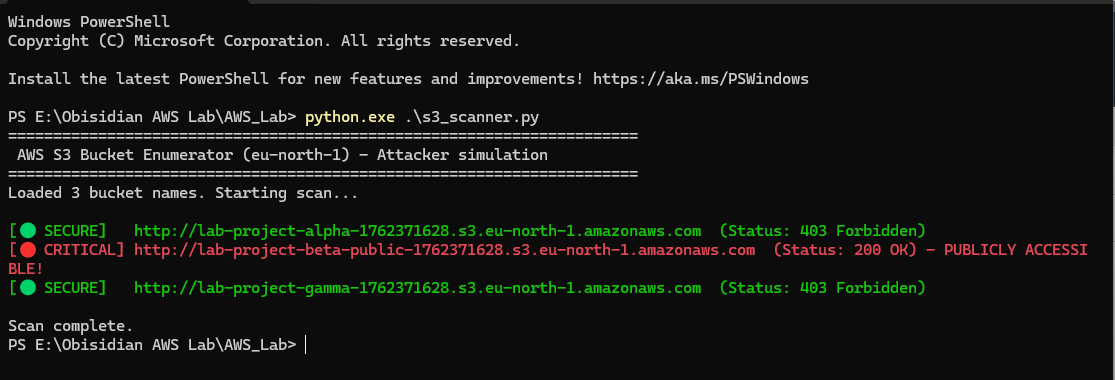
I created Python code to simulate an attacker scanning for accessible buckets. This demonstrates a realistic attack scenario that could occur if the bucket names list were leaked.
import requests
import sys
from requests.exceptions import RequestException

# ANSI color codes for terminal output
class bcolors:
    GREEN = '\033[92m'  # For 403 Forbidden (Secure)
    YELLOW = '\033[93m' # For 404 Not Found
    RED = '\033[91m'    # For 200 OK (PUBLIC!)
    ENDC = '\033[0m'    # Reset color

def check_bucket(bucket_name):
    """
    Checks a single S3 bucket for public accessibility in eu-north-1.
    """
    url = f"http://{bucket_name}.s3.eu-north-1.amazonaws.com"

    try:
        # We send a request with a short timeout.
        response = requests.head(url, timeout=3, allow_redirects=True)

        if response.status_code == 200:
            # 🔴 CRITICAL: 200 means the bucket is public and listable.
            print(f"{bcolors.RED}[🔴 CRITICAL] {url}  (Status: {response.status_code} OK) - PUBLICLY ACCESSIBLE!{bcolors.ENDC}")
        elif response.status_code == 403:
            # 🟢 GOOD: 403 means the bucket exists but is private.
            print(f"{bcolors.GREEN}[🟢 SECURE]   {url}  (Status: {response.status_code} Forbidden){bcolors.ENDC}")
        elif response.status_code == 404:
            # 🟡 INFO: 404 means the bucket does not exist.
            print(f"{bcolors.YELLOW}[🟡 INFO]     {url}  (Status: {response.status_code} Not Found){bcolors.ENDC}")
        else:
            # Any other code is unusual.
            print(f"[?] UNKNOWN:   {url}  (Status: {response.status_code})")

    except RequestException as e:
        # Handle network errors, timeouts, etc.
        print(f"[❌ ERROR]    Error checking {url}: {e}")

def main():
    """Main function to read the file and start the scan."""
    print("="*70)
    print(" AWS S3 Bucket Enumerator (eu-north-1) - Attacker simulation")
    print("="*70)

    try:
        with open('buckets.txt', 'r') as f:
            bucket_names = [line.strip() for line in f if line.strip()]

        if not bucket_names:
            print(f"{bcolors.RED}Error: 'buckets.txt' is empty.{bcolors.ENDC}")
            sys.exit(1)

        print(f"Loaded {len(bucket_names)} bucket names. Starting scan...\n")

        for name in bucket_names:
            check_bucket(name)

        print("\nScan complete.")

    except FileNotFoundError:
        print(f"{bcolors.RED}Error: 'buckets.txt' not found in this directory.{bcolors.ENDC}")
        print("Please create it with one bucket name per line.")
        sys.exit(1)

if __name__ == "__main__":
    main()
Running the scan:
Phase 4: Data Exfiltration
curl "https://$env:BUCKET_B.s3.eu-north-1.amazonaws.com/secret.txt"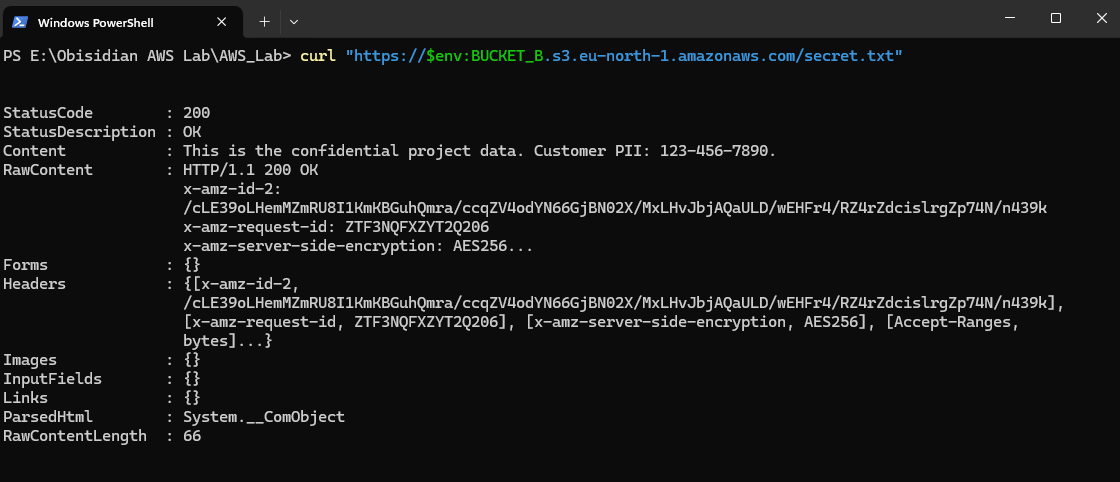
As an attacker without any credentials or permissions, I was able to access and download data from the bucket using CLI commands and scripts.
Phase 5: Remediation
Deleting the Bucket Policy
aws s3api delete-bucket-policy --bucket $env:BUCKET_B --region eu-north-1delete-bucket-policyremoves (deletes) any existing bucket policy attached to the specified bucket.
Enabling Block Public Access
aws s3api put-public-access-block --bucket $env:BUCKET_B --public-access-block-configuration "BlockPublicAcls=true,IgnorePublicAcls=true,BlockPublicPolicy=true,RestrictPublicBuckets=true" --region eu-north-1Verifying the Fix
The curl command now returns a 403 Forbidden error:
curl "https://$env:BUCKET_B.s3.eu-north-1.amazonaws.com/secret.txt"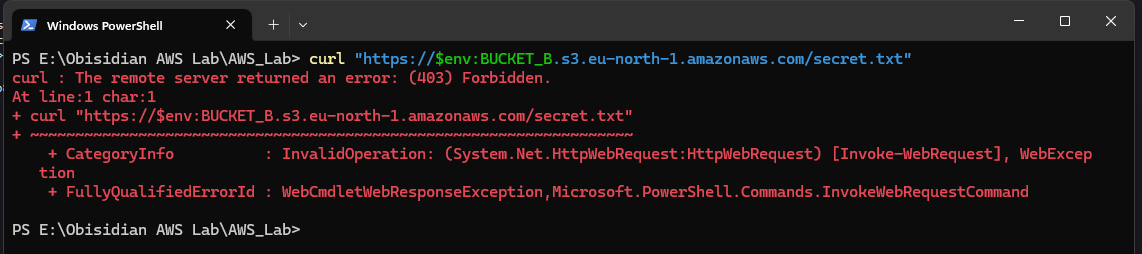
Access is also denied when opening the link directly in a browser:
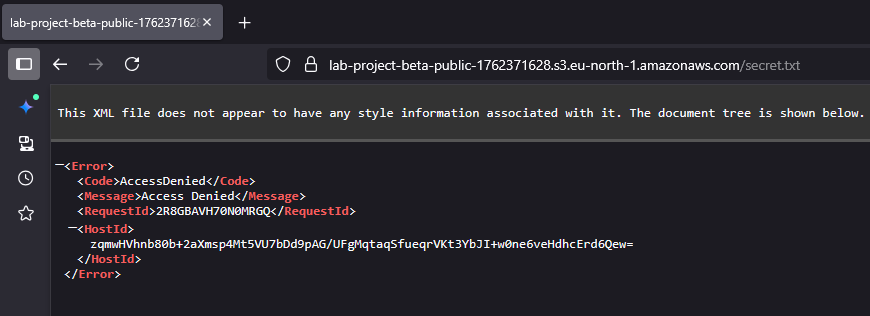
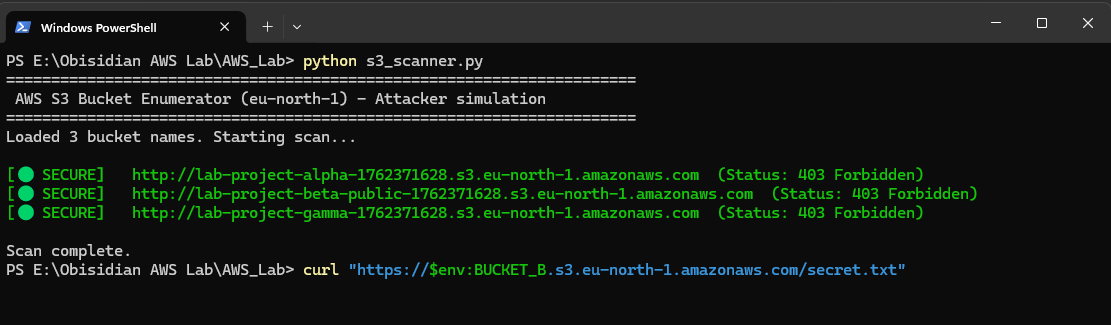
Using the scanner confirms that the secure settings have been restored:
Phase 6: Removing Unused Buckets
A key security measure is removing unused or empty buckets, as they pose an unnecessary security risk.
aws s3 rb "s3://$env:BUCKET_A" --region eu-north-1 --force
aws s3 rb "s3://$env:BUCKET_B" --region eu-north-1 --force
aws s3 rb "s3://$env:BUCKET_C" --region eu-north-1 --force
Lessons Learned
-
S3 Block Public Access (BPA) is your most important defense. It's a "safety latch" that blocks public policies and ACLs. It should remain enabled for nearly all use cases.
-
A Bucket Policy is a powerful, low-level permission. A policy with
Effect: "Allow"andPrincipal: "*"is extremely dangerous and should almost never be used. -
Attackers don't need credentials to find and steal from public buckets. They just need an internet connection and a list of names to guess for the correct region.